The QR code market has become strangely crowded. Some tools promise campaign dashboards, some sell tracking features, and others hide the final destination behind branded short links. That may be useful for marketers, but it also creates a simple concern: when a person scans the code, where are they really going? This is where url to qr code feels worth testing, because its value is not built around complexity. It focuses on turning a provided link into a QR image that can be used directly.
That focus makes the product more interesting than it first appears. At a glance, the page looks like a clean web utility: a URL field, a preview area, output options, style presets, and parameter examples. But the more practical question is not whether it can generate a QR code. Many tools can. The better question is whether the workflow stays transparent enough for long-term materials like packaging, receipts, invoices, signs, PDFs, and internal web apps.
I reviewed it as a working tool rather than a landing page claim. The test was simple: follow the visible process, look at the output choices, inspect how customization is presented, and judge whether the product solves a real operational problem without pretending to be a full marketing platform. The result is a product that is narrow in a useful way. It does not try to make QR generation feel magical. It makes it predictable.
A Utility Built Around Destination Transparency
The most important idea behind the tool is direct encoding. The QR code is designed to contain the URL provided by the user. That distinction matters because many QR services work by creating an intermediate link first, then sending scanners through that link before they reach the final page.
For short-term campaigns, a redirect layer can be useful. It can support analytics, link editing, and traffic routing. But for static printed materials, directness can be an advantage. A QR code on a box, poster, handout, warranty card, or installation manual may stay in circulation long after a campaign dashboard is forgotten. In those cases, depending on fewer moving parts can be a practical benefit.
The Main Testing Question
My main testing question was not whether the QR code looked decorative. It was whether a user could understand the path from input to scan result. The page answers that question clearly. The user provides a URL, the tool turns that URL into a QR code, and the output can be used as PNG or SVG.
That sounds basic, but basic is exactly what many production workflows need. The fewer hidden steps between the source link and the final code, the easier it is for a team to explain, document, and reuse the process.
Why This Matters For Printed Materials
Printed QR codes are less forgiving than digital buttons. Once they are printed, they cannot be corrected with a quick website edit unless the original destination is already under the publisher’s control. This tool does not remove that responsibility. Instead, it makes the responsibility visible: the final QR code points to the link you provide.
Official Steps For Creating A QR Code
The official page presents a short workflow. It does not require a sign-up step before using the generator, and it does not introduce a pricing gate, model choice, or complicated export process in the visible flow.
Step One: Enter The URL
The first step is to paste or enter the destination link into the generator. This is the core action, and it should be treated carefully because the QR code depends on the provided URL.
Use The Final Intended Destination
A practical user should enter the exact page that should open after scanning. If the destination needs campaign parameters, language paths, or product identifiers, those should be included in the URL before generating the code.
Step Two: Choose Output Settings
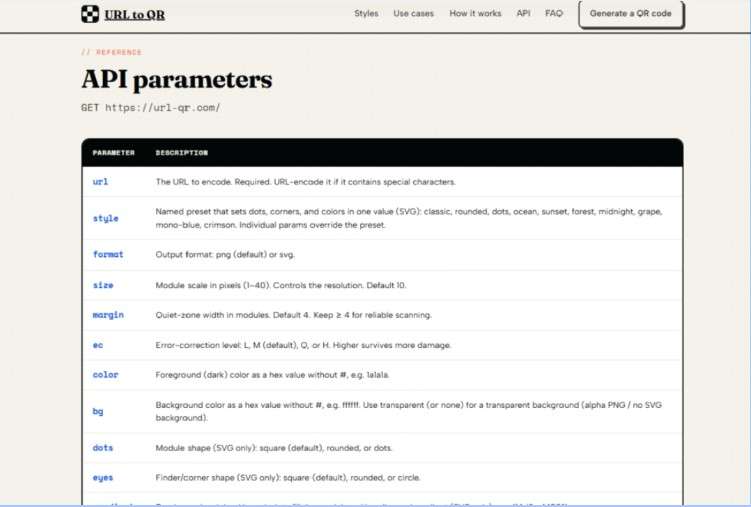
The page offers format options including PNG and SVG, along with size, margin, and error correction controls. These are not decorative extras. They affect how the QR code fits into real materials.
Match Format To The Use Case
PNG is convenient for simple image use. SVG is more suitable when crisp scaling matters, especially in print layouts, documentation templates, and responsive interfaces. Error correction can help when a code may be printed small, handled physically, or placed in a less controlled environment.
Step Three: Customize Visual Appearance
The page includes style presets, foreground and background colors, transparent background support, and SVG-oriented styling such as dot and corner variations.
Keep Scannability Before Branding
Visual customization is useful, but the QR code still has a job to do. High contrast, enough margin, and reasonable sizing should matter more than making the code look unusual. The page’s controls support visual variation, but the final result should always be tested before public use.
Where The Product Feels Most Useful
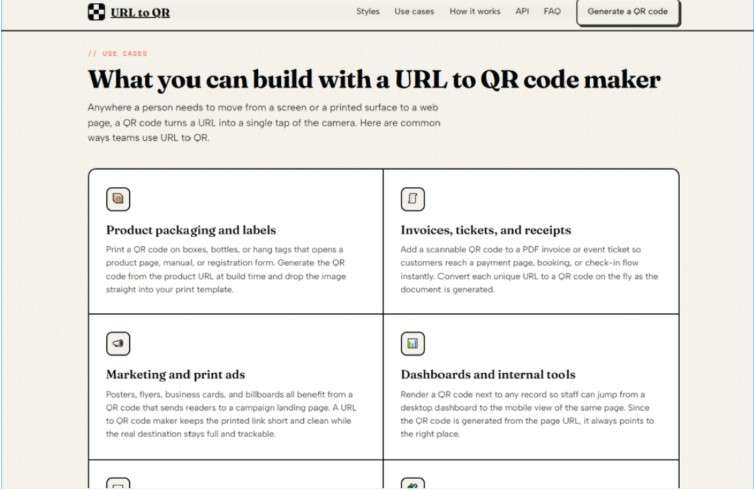
The tool works best when QR generation is only one part of a larger workflow. For example, a product team may already have product pages. A finance team may already create invoice PDFs. A support team may already publish setup documents. In each case, the missing piece is not a full marketing suite. The missing piece is a clean way to turn a URL into a usable QR image.
That is why the product feels especially relevant for operational users. A marketer can create a QR code for a flyer. A developer can embed an image request in a web page. A designer can choose SVG for layout clarity. A small business can generate a code without learning a dashboard. These are different users, but they all benefit from the same thing: a short path from link to image.
Scenario One: Product Packaging
The testing task here is simple: prepare a QR code for a product package that leads to a manual, warranty page, registration page, or support article. The difficulty is that packaging may be printed at different sizes, handled by customers, and scanned under uneven lighting.
From a practical perspective, SVG output, margin control, size control, and higher error correction are the relevant details. The product does not claim to solve packaging design by itself. It provides the QR image layer that can be placed into a package design workflow.
Best User For This Scenario
This scenario suits small brands, print designers, product teams, and operations staff who need a reliable QR image without building a custom generator. It is especially useful when the destination page is already final and controlled by the business.
Scenario Two: Documents And Receipts
Documents often need QR codes for payment pages, order pages, appointment links, account access, or support information. The challenge is repetition. A single QR code is easy. Hundreds of document-specific QR codes can become annoying.
The page shows that QR images can be created through URL parameters and used directly in HTML or backend requests. That makes the url to qr code generator more useful than a manual-only tool. A developer can generate image links programmatically, while a non-technical user can still use the visible interface for one-off needs.
Best User For This Scenario
This is a strong fit for SaaS teams, invoice systems, internal tools, and document automation workflows. It is not a replacement for the system that creates the document. It is a practical way to add a QR image to that system.
A Simple Comparison For Practical Buyers
| Criteria | Direct QR Image Workflow | Full Campaign QR Platform |
| Main purpose | Turn a URL into a QR image | Manage campaigns and tracking |
| Link behavior | Encodes the provided URL | Often uses redirect links |
| Setup effort | Low for basic use | Usually higher |
| Visual control | Practical styling and formats | Often broader design systems |
| Developer use | Easy through image URLs | Depends on API access |
| Analytics | Not presented as core feature | Often a key selling point |
| Best fit | Static assets and embedded workflows | Marketing campaigns needing reports |
This table shows the product’s position clearly. It is not trying to compete with every QR platform on every feature. Its value is in being lightweight, direct, and easy to place inside existing work.
Limitations That Should Stay Visible
The main limitation is that direct QR codes are not dynamic campaign objects. If the encoded URL needs to change later, the QR code itself usually needs to be replaced unless the destination page is controlled separately. This is an important tradeoff, not a hidden defect.
Another limitation is that visual customization requires judgment. A QR code with low contrast, too little margin, or aggressive styling may be harder to scan in real conditions. The generator gives useful controls, but it cannot guarantee that every design decision will work well on every phone, material, or lighting setup.
The product also does not present itself as a scan analytics system. Users who need dashboards, visitor data, A/B routing, or editable short links should treat this as a different category of tool. It is better understood as a focused generator and URL-based image service.
A Better Fit For Clear QR Workflows
The most persuasive thing about this product is that it does not overcomplicate a common job. It gives users a URL field, QR preview, PNG and SVG output, sizing, error correction, color controls, style options, and examples for embedding or backend use. That is enough for many practical workflows.
It is best for people who want to know what their QR code contains, need a clean output quickly, or want to add QR generation into a website or document process. It is less suitable for users whose main goal is tracking behavior after the scan.
For teams that value transparency over dashboards, this kind of direct QR workflow makes sense. It keeps the QR code close to the original link, keeps the interface understandable, and keeps the tool focused on a job that still matters: helping people move from a physical or digital surface to the right web page.