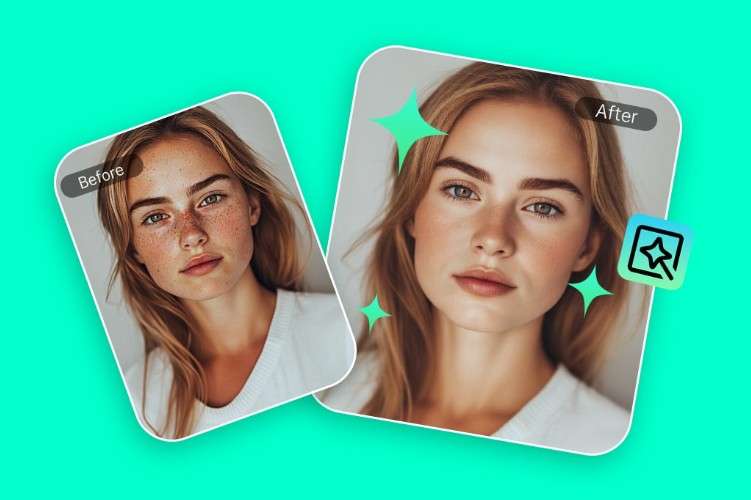
Capturing a perfect portrait is an art, but even the best shots can benefit from portrait enhancement. Whether you are a professional photographer or a casual enthusiast, enhancing face photos naturally can elevate your images without making them look artificial. With modern tools like AI photo editor software and smart editing techniques, improving facial details, lighting, and color balance is easier than ever.
This article will guide you step-by-step on how to enhance portrait photos, highlighting both PC and mobile solutions, and sharing tips to achieve natural-looking results.
1. Image Quality Factors That Matter in Portraits
Before editing, it’s important to understand the elements that affect portrait quality. These factors determine the final look of your photos and how much enhancement is necessary:
- Facial Sharpness and Detail: Eyes, lips, hair strands, and skin texture are critical for a realistic portrait. Blurred or soft details can make a photo appear flat or low quality.
- Lighting and Exposure on Skin: Proper lighting highlights facial features and contours. Shadows and overexposed areas can distract from the subject’s natural beauty.
- Skin Tone and Color Accuracy: Maintaining accurate skin tones is essential for natural-looking portraits. Over-correction or unnatural hues can ruin realism.
- Resolution and Noise Levels: High-resolution images allow for fine retouching without losing detail. Noise reduction is important, especially in low-light photos, but excessive smoothing can make skin look plastic.
Keeping these factors in mind helps you decide which adjustments to make during portrait enhancement.
2. Common Portrait Problems in Real Photos
Even with careful shooting, real-world photos often face challenges:
- Uneven or harsh lighting creating shadows on the face.
- Skin imperfections such as blemishes, redness, or fine lines.
- Slight blurriness from camera shake or focus issues.
- Color inconsistencies or unnatural skin tones.
- Digital noise, especially in indoor or low-light settings.
These issues are why how to enhance portrait photos has become a popular skill among both professionals and hobbyists.
3. How to Enhance Portrait Photos on PC
Desktop tools offer the most precise control for portrait enhancement. Programs like Adobe Photoshop, Lightroom, and specialized software such as Leawo Photo Enhancer can significantly improve your face photos.
Using Leawo Photo Enhancer as an Example:
Leawo Photo Enhancer is an AI-powered tool designed to improve portrait photos naturally. It simplifies complex editing tasks like exposure correction, noise reduction, and skin enhancement.
Steps to Enhance Portrait Photos on PC:
- Import Your Image: Open Leawo Photo Enhancer and load your portrait.
- Adjust Lighting and Exposure: Use AI-powered adjustments to brighten shadows and tone down highlights without overexposing the skin.
- Enhance Skin Texture: Smooth minor blemishes while maintaining natural skin pores.
- Sharpen Facial Features: Improve eye clarity, hair detail, and lip definition for sharper, more engaging portraits.
- Correct Colors and Tones: Balance skin tones and adjust color vibrancy for a realistic look.
- Save and Export: Choose the desired output format and resolution to retain quality.
Other AI portrait enhancer tools like Luminar AI or Topaz Studio offer similar features, using machine learning to intelligently retouch photos while keeping them natural.
4. How to Enhance Portrait Photos on Phone
Mobile apps make portrait enhancement convenient on the go. Many smartphones also include built-in AI features in their camera or photo apps. Popular mobile options include:
- Snapseed: Offers selective adjustments, healing tools, and skin smoothing.
- Lightroom Mobile: Provides professional-level exposure, color grading, and sharpening controls.
- Facetune: Designed for portrait retouching, including skin smoothing and eye enhancement.
Steps to Edit Portrait Photos on Mobile:
- Open your preferred app and import the portrait.
- Adjust brightness, contrast, and shadows for natural lighting.
- Use skin tools sparingly to reduce blemishes while maintaining texture.
- Enhance eyes, teeth, and hair to subtly draw attention to facial features.
- Export the image at the highest resolution available.
Mobile solutions are ideal for quick edits, social media sharing, and situations where you don’t have access to a PC.
5. Tips for Natural-Looking Portrait Enhancement
The goal of portrait enhancement is to improve your image without making it look artificial. Here are some tips to achieve natural results:
- Avoid Over-Smoothing Skin: Excessive skin retouching can make the portrait look fake. Keep pores and texture visible.
- Adjust Lighting Carefully: Use soft corrections instead of dramatic changes. Subtle shadows and highlights maintain depth.
- Preserve Facial Features: Don’t over-enlarge eyes or lips—enhancements should enhance, not exaggerate.
- Use AI Tools Wisely: Tools like AI photo editor software provide automation, but manual fine-tuning ensures realism.
- Compare Before and After: Always check edits against the original to make sure enhancements feel natural.
- Focus on Key Details: Eyes, lips, and hair often define a portrait. Sharpen these selectively instead of applying global edits.
By following these guidelines, you can enhance portrait photos effectively while maintaining authenticity.
Conclusion
Portraits are more than just images—they capture personality, emotion, and style. Portrait enhancement allows you to improve face photos naturally, correcting lighting, color, and minor imperfections without compromising realism. Desktop tools like Leawo Photo Enhancer offer powerful AI-driven enhancements, while mobile apps provide convenient on-the-go solutions.
Whether you’re a professional photographer or someone looking to perfect your social media profile pictures, following the right techniques and maintaining subtlety ensures your portraits remain authentic and visually appealing. By using tools like ai portrait enhancer and practicing careful editing, anyone can take their portrait photos to the next level.
Enhancing your portraits naturally is no longer a challenge—it’s an opportunity to highlight your subject’s beauty while keeping the final result true to life.