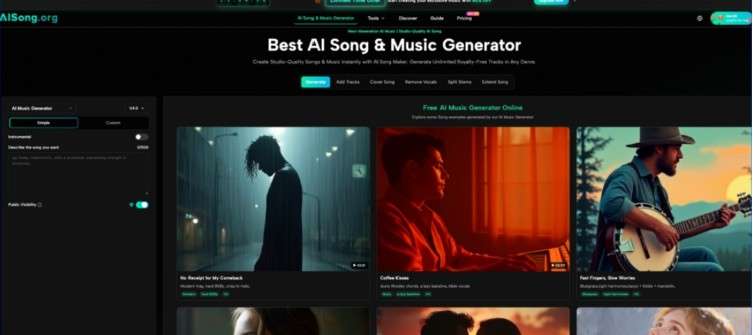
Last Wednesday, at 9:42 a.m., a long-standing client sent a brief: they needed a 60-second branded product video delivered by end of day, and this time, stock music was explicitly off the table. The edit was ready, but the track had to feel original—custom, even—with no budget for a composer and no time for a music library deep dive. That morning, I decided to test whether an AI Song Generator could actually function as an emergency music department, not just a curiosity tab I had left bookmarked.
The experiment was not about finding a masterpiece. It was about answering one question under real pressure: can a text-to-music tool deliver a client-ready instrumental, with clear licensing, before the render queue finishes?
The Demanding Brief That Left No Room for Trial and Error
The video showed a montage of handcrafted leather goods, and the client wanted a track that felt warm, organic, and slightly cinematic, with a defined lift at the 30-second mark. They also requested a version without percussion for the voiceover segments. Normally, this would involve searching through premium libraries, negotiating extended licenses, and layering stems in a DAW. This time, I opened a browser instead.
Translating a Client Brief into a Single Text Prompt
Rather than clicking through genre tags, I wrote a plain-sentence description directly in the input field: “acoustic folk instrumental with fingerpicked guitar, subtle cello, and a building emotional swell starting halfway, no drums.” The platform immediately accepted natural language, and I did not need to add BPM or key signatures. This simplicity cut down the translation time between what the client described and what I asked the system to generate.
The First Output and Why It Fell Short
The initial track arrived quickly. It had the right instrumentation and a pleasant melody, but the emotional swell peaked too early—around the 20-second mark—which would have clashed with the visual cut. Instead of tweaking parameters, I refined the prompt, moving the build instruction to the exact midpoint. This second generation understood the structural cue far better, suggesting the model respects temporal instructions when they are written with clear placement. The lack of granular editing inside a single generation remains a friction point, but from a deadline perspective, rewriting a sentence and waiting again was still faster than slicing audio manually.
Working Step by Step Inside the Platform Under Time Constraint
Because every minute counted, I did not explore side features. I followed the exact core workflow the platform presents, which kept the process linear and decision-light.
Step 1: Write the Musical Instruction
The interface centers on a text box, and in this context, that minimalism felt like a design choice, not an omission. There were no advanced settings to distract from the task.
Choosing Words That Map to Musical Structure
Based on how the model responded, I learned to treat prompts like scene directions: mention the arc, not just the mood. Describing when an element should enter or fade gave me more predictable arrangements. This is different from writing a musical score, but for a video editor, the language felt natural.
Skipping Optional Fields to Move Faster
I left the lyrics section blank and did not use the thematic lyric generation, which would have added creative time I did not have. The pure instrumental path required nothing more than the description and a click to submit.
Step 2: Let the AI Assemble the Audio
Once submitted, the system began generating the full arrangement. I watched the queue indicator and prepared for a short wait.
What Happens While the Track Is Being Built
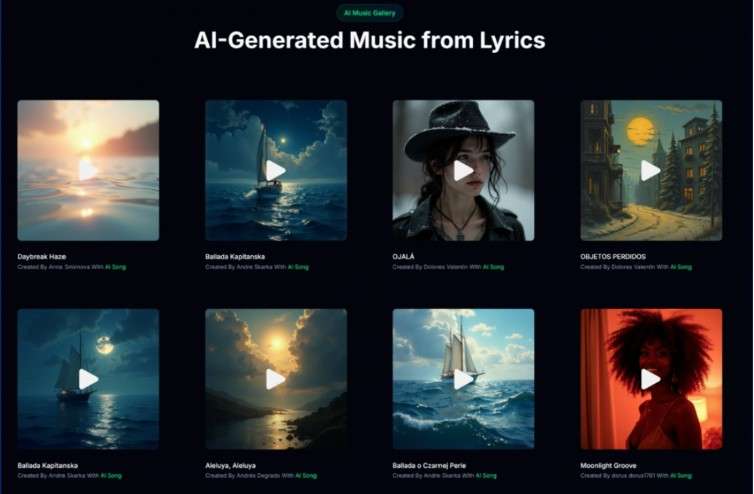
The platform does not expose instrument stems or a mixer view during generation, so there is no way to guide the process mid-stream. That lack of transparency is the price of speed. However, in my experience, the waiting period remained short enough to stay inside the editing flow—I continued color grading the video while the audio was processing. When it finished, playback was immediate.
Step 3: Download and Confirm Licensing Terms
The moment the track played back correctly, I hit download. The file arrived as a high-quality MP3, ready to drop onto the timeline.
Why the Rights Section Matters More Than the Waveform
Before sending the final export, I checked the licensing information again. The platform clearly states that generated music is royalty-free and includes commercial use. In a deadline scenario, that single line of text prevented a lengthy email exchange about attribution or sync rights. Knowing the track could go straight to the client without a separate license agreement removed the legal anxiety that often shadows last-minute audio replacements.
Where the Workflow Saved Hours and Where I Stayed Cautious
The AI Song Maker did not make me a composer, but it did remove the hunt. In a normal workflow, I would spend at least ninety minutes auditioning stock tracks that almost fit the edit, then another thirty tweaking levels and negotiating a license tier. Here, from prompt to final file in the timeline, I spent roughly twenty minutes.
The trade-offs are real. The AI can still misinterpret emotional nuance if the prompt is too vague; a request for “melancholy but hopeful” gave me something closer to a generic corporate piano on one attempt. I had to learn quickly that specificity—naming instruments, describing the arc, stating what to avoid—produced dramatically better results. Complex requests that asked for multiple distinct sections in a single prompt sometimes returned a track that flattened the transitions. This means a user who needs a through-composed piece with shifting time signatures will not find that control here, at least not in my testing.
The vocal-free instrumental output worked perfectly for the task, but I did not test lyric generation in this rushed session, so I cannot speak to that feature’s consistency under time pressure. Still, for the assignment at hand, the tool acted as a direct replacement for a royalty-free library search with far better customization.
Old Rush Process Versus AI-Assisted Delivery Under a Deadline
To make the time difference concrete, here is how the scramble for last-minute music looked before and after integrating this platform into the rescue workflow.
| Aspect | Traditional Last-Minute Music Hunt | AIsong-Based Emergency Workflow |
| Time to first usable candidate | 45–90 minutes of library searching | Under 5 minutes per generation attempt |
| Ability to match a specific edit structure | Limited to pre-built track arrangements | High, through prompts that describe the song’s arc |
| Licensing complexity | Must verify tier, attribution, and platform restrictions per track | Uniform royalty-free commercial terms, stated clearly |
| Iteration cost | Searching again from scratch or editing stems manually | Rewriting and regenerating a prompt in seconds |
| Musical originality | Stock tracks can be heard in multiple other projects | Every output is generated uniquely for your prompt |
| Dependency on external collaborators | May require a composer or audio editor for deep customization | Self-contained; no back-and-forth needed |
The table does not argue that AI replaces a skilled music supervisor on a high-budget production. It does show that for creators who regularly face “we need this today” requests with zero music budget, the AI Song Maker shifts the bottleneck from sourcing to simply describing.
Deadline-driven work exposes a tool’s real value, and in this test, the value was not sonic perfection. It was the ability to hand a client an original, legally safe track before the sun went down, without ever leaving the editing suite. For the one-person production teams, the freelance editors, and the in-house content studios that routinely stretch thin, that is not a gimmick. That is a recovered evening.