The gap between a visually impressive AI generation and a production-ready asset is often a chasm of technical debt. For many creators, the initial “wow” factor of a prompt-based image quickly dissolves when that image is subjected to the scrutiny of a layout designer or a brand manager. A stray sixth finger, a distorted background object, or a stylistic drift that makes two images from the same batch feel like they belong to different universes—these are the frictions that prevent generative AI from moving out of the “playground” phase and into the “pipeline” phase.
To move from creative experimentation to reliable production, creators must treat AI output as raw material. It is rarely the final product. Reliable workflows require a transition from “prompt engineering” to “surgical intervention,” where a generative output is refined through an integrated AI Image Editor to meet specific technical and aesthetic standards.
The Fragility of the Raw Prompt Output
The “first-shot fallacy” is the belief that because a model can produce a stunning image in fifteen seconds, the work is ninety percent done. In reality, for professional use cases—such as social media ad creative, website hero sections, or product lookbooks—the raw generation is often only forty percent of the way there. Raw outputs are inherently fragile because they lack the intent of a human creative director.
Common failure points include anatomical artifacts that only become visible upon close inspection or background “noise” where the model has hallucinated shapes that distract from the main subject. In a marketing context, these are not just aesthetic flaws; they are trust-killers. An audience might not consciously notice a distorted shadow, but they will feel the “uncanny valley” effect, leading to lower engagement or brand skepticism. The shift in mindset required here is moving from “generating images” to “building assets.” An asset must be stable, scalable, and above all, correct.
Anchoring Style through Model Selection
Maintaining consistency across a campaign is the primary challenge for indie makers. If you are creating a series of visual assets for a product launch, you cannot afford stylistic drift. One image looking like high-contrast photography while the next looks like soft-focus digital art will break the visual narrative.
This is where model selection becomes a strategic decision rather than a random choice. For instance, selecting a model like Flux often provides a better baseline for photorealism and complex prompt adherence, while other models like Nano Banana might excel in different stylistic niches. The goal is to choose a foundational architecture that provides a consistent visual thread.
Why Consistency Breaks Down
Even with the same seed and prompt, generative models can deviate based on the complexity of the subject matter. This is a point of uncertainty in current workflows: we cannot yet guarantee that a model will interpret “cinematic lighting” the same way across five different character poses. Creators must expect to intervene. Instead of re-rolling the prompt fifty times hoping for a perfect match—a process that wastes time and credits—professional creators accept a “close enough” generation and move it immediately into a refinement stage.
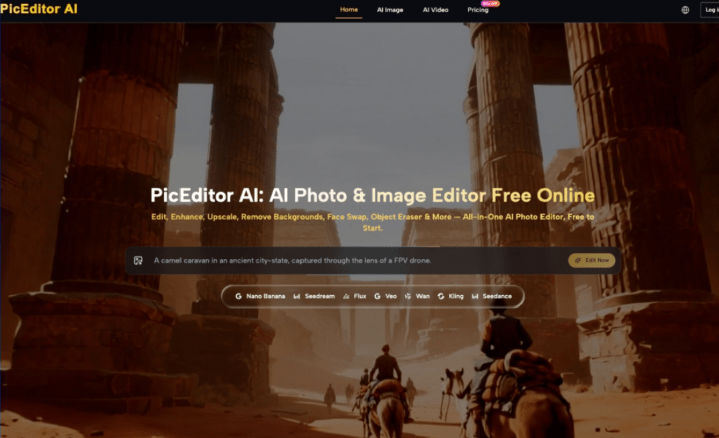
Surgical Correction in the AI Photo Editor
Once a base image has the correct composition and style, the process moves into high-precision editing. This is where most “prompt-only” creators fail. They try to fix details by adding more keywords to the prompt, which usually results in the model changing the entire image structure.
Using a dedicated AI Photo Editor allows for object removal and distraction clearing without altering the core of the image. If a generative model placed a strange, unidentifiable blob in the corner of a clean office setting, you don’t re-generate; you erase. This surgical approach is also vital for face swapping and expression tuning. In many campaign scenarios, the “vibe” of a character is perfect, but the facial expression is too intense or slightly off-model. Tools that allow for targeted facial replacement or expression modification ensure that the character aligns with the specific mood of the campaign brief.
At this stage, an AI Image Editor becomes the primary tool for maintaining the integrity of the asset. Whether it is adjusting the color balance to match a brand palette or removing a hallucinated logo from a shirt, these manual-yet-AI-assisted interventions are what separate a hobbyist’s post from a professional’s delivery.
Resolution Realities and the Upscaling Threshold
A recurring limitation in generative media is native resolution. Most high-performing models generate at dimensions suitable for social feeds but insufficient for large-scale web hero images or print. There is a common misconception that “upscaling” is just making an image bigger. In a professional workflow, upscaling is an act of restoration.
There is a distinct difference between simple pixel interpolation—which often results in a blurry, “plastic” look—and AI-driven detail enhancement. Professional-grade upscalers actually interpret the textures in the image, adding skin pores, fabric weaves, and sharp edges where they were previously soft.
However, creators must be cautious: upscaling can sometimes introduce its own artifacts. It can over-sharpen edges or create a “painterly” effect on skin that looks unnatural. The expectation-reset here is that upscaling is not a “set and forget” process. You must identify the exact moment an image has the right composition but lacks the texture, then apply upscaling with a restrained hand to ensure the final output remains grounded in reality.
Navigating the Threshold of AI Failure
Despite the rapid advancement of these tools, there are hard ceilings that every creator will eventually hit. One of the most persistent challenges is rendering specific, legible text. While models like Flux have made massive strides in typography, they still struggle with long sentences or specific brand fonts.
If your campaign requires a specific headline or a brand-accurate logo, current generative technology is often not the right tool for that specific layer. This is where human-led compositing is non-negotiable. You generate the background, the atmosphere, and the subject, but you layer in the typography and logos using traditional design methods.
Another limitation is brand-specific geometry. If you are trying to generate a very specific, patented product design, the AI will likely “hallucinate” variations of it rather than rendering it with engineering precision. In these cases, the generative asset serves as the environment, while the product itself should be a high-quality 2D or 3D render composited into the scene. Acknowledging these “uncanny valley” triggers early in the process saves hours of frustrated prompting.
Collapsing the Creative Workflow
The “tool-switching tax” is a real drain on productivity. Moving from a generation platform to a separate retouching software, and then to an upscaler, often leads to version control issues and a fragmented creative process. The trend among successful indie makers is moving toward unified platforms that handle the entire lifecycle of an image.
By leveraging a unified AI Photo Editor platform, creators can move from a text-to-image prompt to a background removal or an object erase in a single interface. This continuity allows for faster iteration. If a social media manager needs three different aspect ratios of the same scene, the ability to “outpaint” or expand the canvas within the same environment where the image was born is a massive efficiency gain.
A final checklist for a production-ready asset should include:
- Resolution: Does it meet the minimum DPI or pixel count for the target medium?
- Clarity: Have anatomical errors or background hallucinations been surgically removed?
- Stylistic Alignment: Does it match the other five images in the campaign set?
- Brand Integrity: Are the logos and text sharp and accurate, or are they AI approximations?Generative AI has lowered the floor for entry into creative production, but it has not lowered the ceiling for professional quality. The most effective creators today are those who use the AI Image Editor as a scalpel, refining the raw, chaotic output of the generator into a polished, stable asset that can stand up to the demands of a real-world campaign. Professionalism in the age of AI isn’t about the prompt you write; it’s about the editing decisions you make after the prompt is finished.